
Text Message Opt-In
How Executive Mechanic asks for your consent to send you text messages
How Executive Mechanic asks for your consent to send you text messages
Executive Mechanic LLC sends text messages to customers and to the mechanics in our network. We only text people who have asked us to. This page shows exactly where and how we ask, the wording you agree to, what we send afterwards, and how to stop at any time.
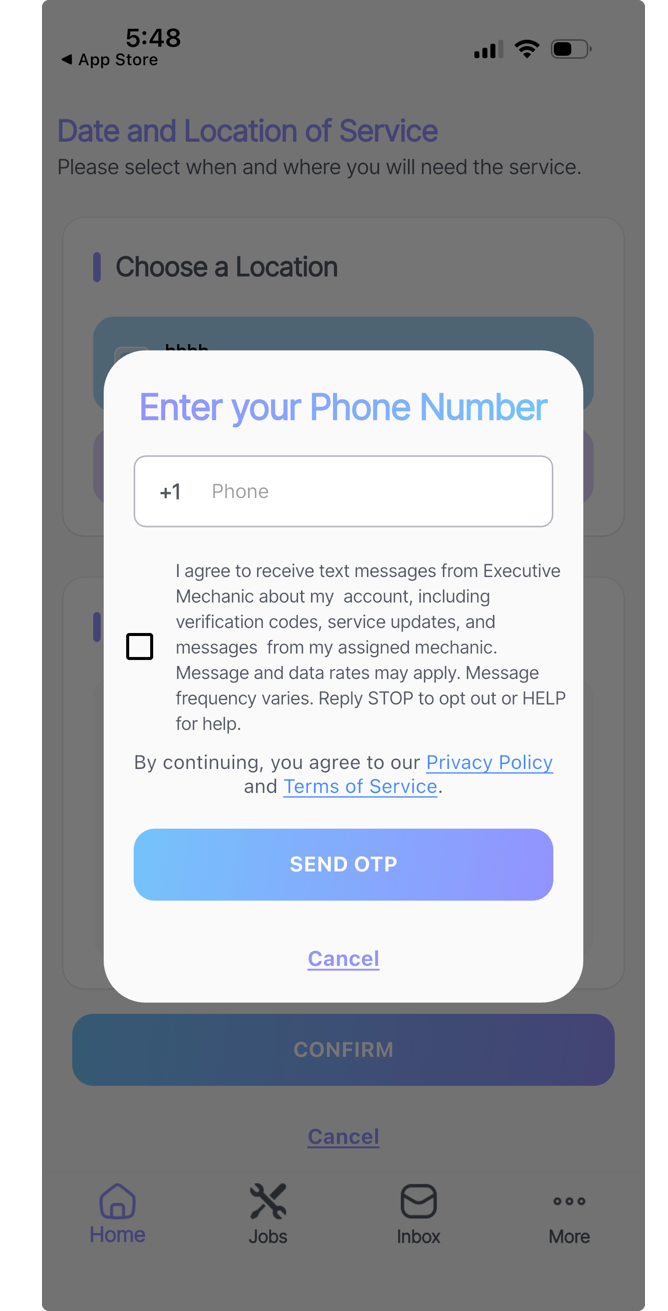
In both places you enter your own mobile number and tick a box that is empty until you tick it, on the same screen, before we send you anything at all. Nothing is pre-selected, and we never add a number that was given to us by somebody else.
No text is sent before the box is ticked — not the verification code, not anything else. Consent comes first, on the same screen where you give us the number.
This is the consent step exactly as it appears in the app. The box sits directly beneath the field where you type your number, above the button that sends the code:
We do not send marketing or promotional text messages, and we do not sell or share your mobile number or your consent with third parties or affiliates for their marketing.
Executive Mechanic: Your verification code is 481920. Reply STOP to opt out, HELP for help.
Executive Mechanic: Dave has been assigned to your outboard service on Thu 12 Sep. Reply to this message to reach him. Reply STOP to opt out, HELP for help.
Executive Mechanic: New job available near Fort Lauderdale, FL. Open the app to accept. Reply STOP to opt out, HELP for help.
Message frequency varies with your account activity and any active service requests. Executive Mechanic does not charge you for text messages, but message and data rates may apply from your mobile carrier.
Reply STOP to any message and we will stop texting you. You will get one confirmation message and nothing after that. Because your carrier blocks everything once you opt out, that confirmation is the last text we can send you — after it, we will reach you through the app and by email instead.
Reply HELP to any message for help, or contact us here.
Opting out does not close your account, but it does stop the verification codes used to sign in, so you may need to opt back in before you can log in again. You can opt back in at any time from your profile in the app.
Section 6 of our Privacy Policy covers how we handle your mobile number and your messages. Our Terms of Service govern your use of the platform.